Journaling on iOS With Shortcuts
4 minutes readI want to keep a journal, I have three requirements:
- The data must be stored as plain text and plain images on disk, that I own.
- The entries must be labelled with their creation timestamp, location, and ideally weather information.
- I want to be able to create a journal entry from an image. The above metadata should be loaded from the image.
I started journaling with Day One1. After it got sold I have lost faith in its future. They also use a proprietary database with limited export options which fails my condition 1.
Apple’s Journal looked interesting, but it does not satisfy my conditions 1 and 3.
I looked into self-hosted options:
- Journiv2 — has a terrible frontend, uses a database instead of markdown, has asinine features like “reflect now” that can not be turned off.
- Obsidian — would be great but does not support 3 and requires their paid sync service on iOS.
Diar - iOS shortcuts for authoring journal entries
When I squinted at my requirements I realized that what I need is a Hugo3 blog with a login and different syntax + some goodies, and a couple of iOS shortcuts.
I always start programming by defining my data structures. First, I’ve decided on the syntax of my entries:
Since the only mandatory metadata is the timestamp, the obvious format is a markdown file with the timestamp as filename and the entry in the text.
For the other metadata I wanted something human readable and editable. I didn’t want to use a preamble like Hugo does.
My solution is to add a footer using the --- markdown syntax for a horizontal
rule. Then use hashtags for tags, lines starting with /images/ for images,
location prefixed by @ and a simply parsed weather. If there is a line that
matches neither, it is interpreted as plain text location.
E.g.: in a file named 2006-01-02T150405.md:
This is an entry inside my journal, as you can observe it just starts as a plain text.

You can use markdown. I only really use emphasis and blockquotes.

---
/images/a-nice-illustration.jpg
#rhea #journaling
Home, France
@48.8687162,2.2219584
17°C, Cloudy
All of the footer entries are optional.
It was easy to create two shortcuts in iOS to:
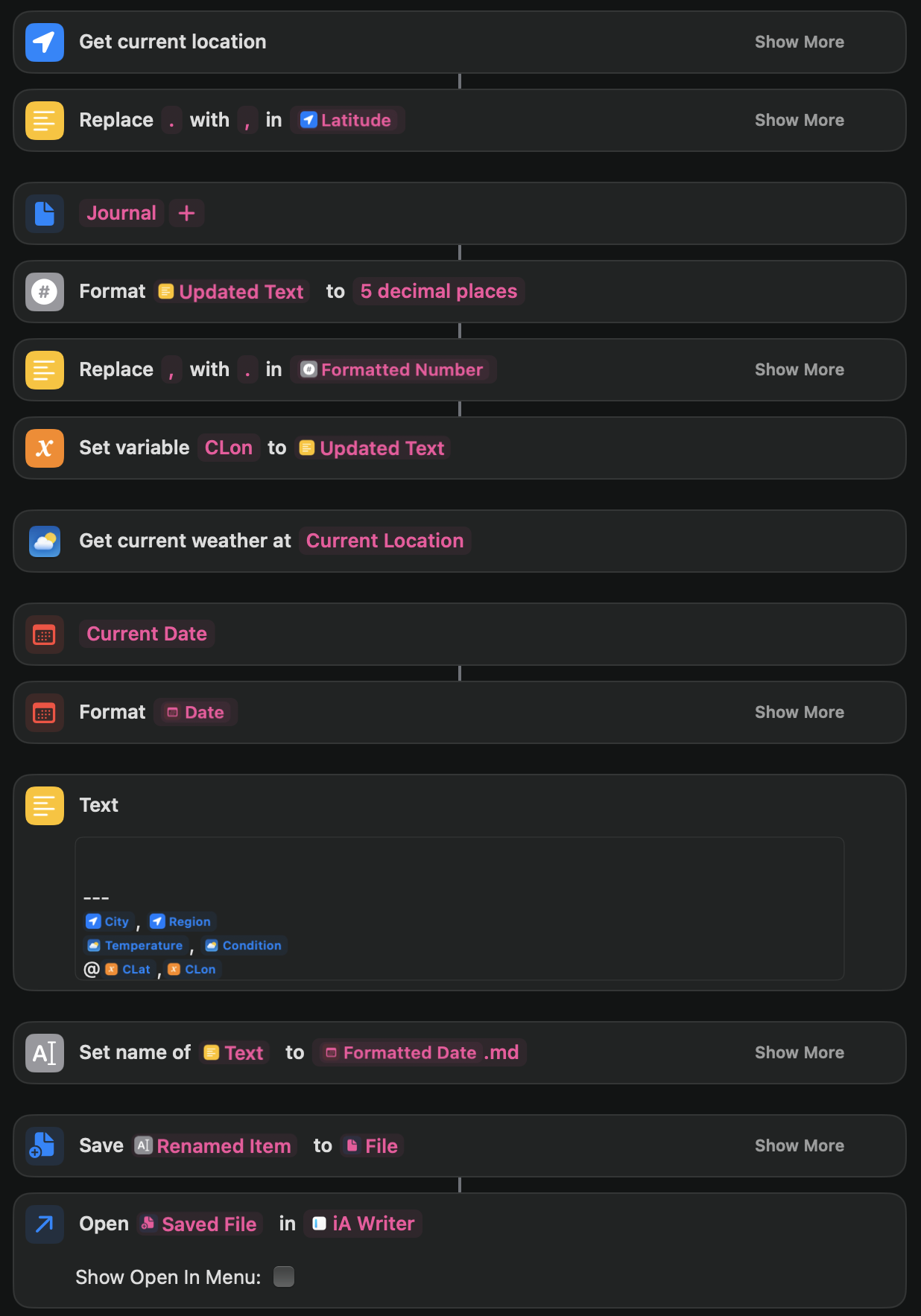
- Grab the current location, weather and address and write a new note with current timestamp as filename with this information. Then open the file immediately with iA Writer.
- Receive an image, use it’s exif to get the time and location. If the date is today, grab the weather. Copy the image into the desired location, create the note and open it in iA Writer.
The advantage of handling images this way is that iA Writer supports displaying them in preview mode.
For the first use case the shortcut looks like this:
Rhea - Go server to render the journal in a nice way
Since I knew Hugo was almost what I wanted, I decided to learn Go and write my server.
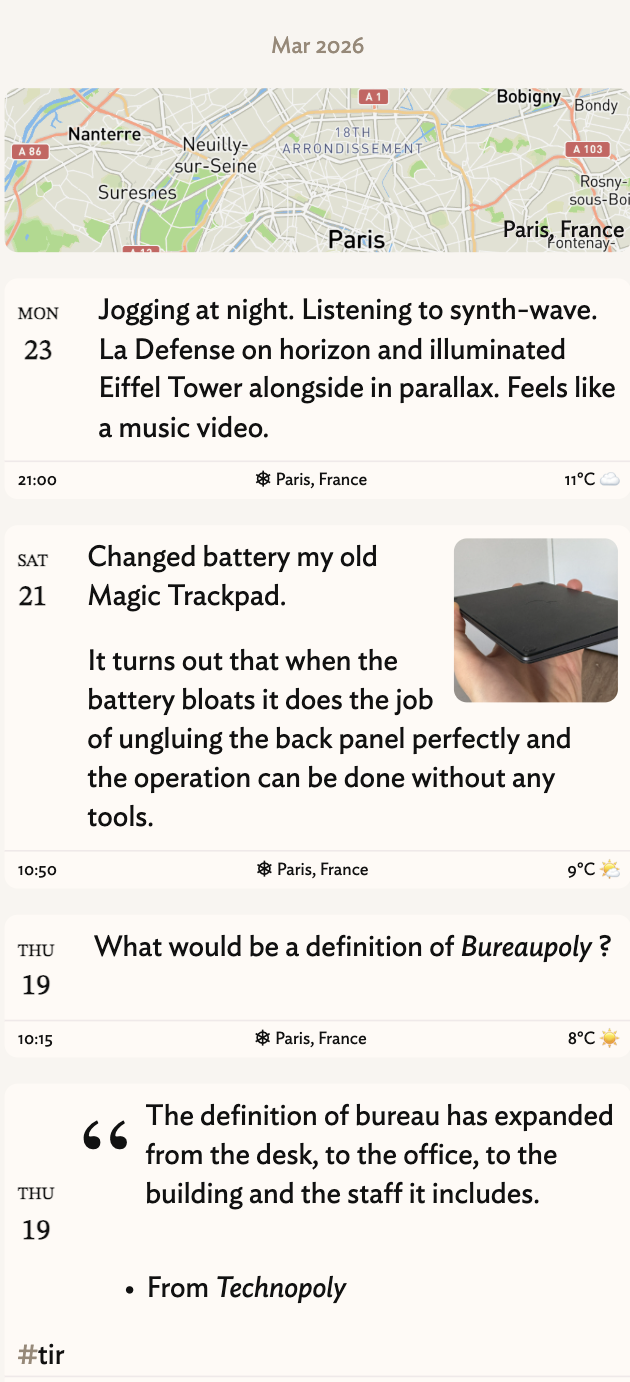
My design goes roughly this way:
- Fully server-rendered html page.
- No static rendering, live-running server only.
- Single user, the login credentials are passed through environment.
The program should do the following.
- On startup look into the directory that contains the entries.
- Iterate over the entries.
- If the entry contains an image, generate a thumbnail for it if it hasn’t been done and store it in a cache directory.
- If the entry contains a location, use MapBox to fetch the map, and store it.
- Start watching the entries directory and update the in-memory representation if anything is added or changed.
- Start a web server that serves:
/- At root show list of the first page of entries, show the location map if the location changed from previous entry by more than 50km. Show images as thumbnails./after/TIMESTAMPand/before/TIMESTAMPto serve a next/previous page./memories/TIMESTAMP- Show a detailed entry with full size images and a more detailed location map./images,/thumbails,/tiles-ZOOM,static- Just serve the files./login- Render this page if there is no valid session cookie set.
And that’s about it. Cook this with some nice templates and a bit of CSS and we have a journaling app.
If you would like the source code feel free to ask, I am no longer publishing my repositories publicly.
-
https://www.journiv.com/ - looked promising but the setup is too cumbersome. ↩︎